
Main past 7+ saalon se video editing aur digital visual production ki field mein actively kaam kar raha hoon, jahan maine traditional NLE software se lekar modern Artificial Intelligence workflows tak sabhi tools ko rigorously test kiya hai. Editing domain ke isi practical exposure aur industry trends ko main apne YouTube channel m4editorofficial par share karta hoon, jahan hamari 13.6K subscribers ki active community hai. Iske sath hi hamare Instagram page m4_editor_official par 145K followers regular motion graphics, colour grading, aur AI editing tutorials se naye tricks seekhte hain. Is platform par mera vision bilkul clear hai — beginners aur aspiring creators ko bina kisi confusing tech jargon ke authentic, tested, aur real-world editing guidance provide karna taaki aap bina kisi unnecessary expenditure ke apne content Creation level ko boost kar sakein.
Best Free AI Video Editing Tools 2026: Top 15 Premium & Free Tools for Beginners M 1
Video creation landscape pichhle kuch saalon mein poori tarah badal chuka hai. Aaj ke time mein agar aapko Instagram Reels, YouTube Shorts, ya long-form podcasts produce karne hain, toh aapko manual cutting, frame-by-frame masking, ya tedious audio cleaning mein ghanton barbaad karne ki zaroorat nahi hai. Artificial Intelligence algorithms ne editing speed ko 10x tak accelerate kar diya hai.
Lekin sabse bada challenge yeh hai ki market mein hazaron AI tools available hain, aur har tool claim karta hai ki woh “best” hai. Kuch tools beginners ke liye perfect hain, jabki kuch tools high-end professional workflows ko target karte hain. Is complete breakdown guide mein hum Best Free AI Video Editing Tools 2026 ke baare mein baat karenge, jismein humne top 15 tools ko Free AI Tools aur Premium AI Tools ke do separate categories mein divide kiya hai.
Aap chaho ek beginner editor ho ya ek busy content creator, yeh A-to-Z breakdown aapko aapke setup aur budget ke according right AI editor choose karne mein help karega.
Part 1: Top 8 Best Free AI Video Editing Tools for Beginners
Yeh wo tools hain jo ya toh completely free hain ya fir unka free tier itna generous hai ki beginners bina kisi subscription ke professionally high-quality videos create kar sakte hain.
1. CapCut AI
CapCut aaj ke date mein short-form content creators ke liye undisputed king bana hua hai. Iska AI suite mobile aur desktop dono platforms par seamlessly cha
lta hai.
- Key AI Features: Auto-captions generation, One-click background removal (sans green screen), AI Smart Cutout, Motion Tracking, aur AI Body Effects.
- Advantage: Completely intuitive interface, zero learning curve, aur massive built-in stock library ke sath heavy effects export capabilities.
- Disadvantage: Kuch specific AI features ke liye cloud rendering time leta hai aur desktop version mein region-specific accessibility settings follow karni padti hain.
2. DaVinci Resolve (Free Version with AI Neural Engine)
DaVinci Resolve industry-standard professional editor hai jiska free version feature-packed hai. Iska Neural Engine AI capabilities se equipped hai.
- Key AI Features: AI Voice Isolation (background noise cleanup), Scene Cut Detection, Smart Reframe for vertical videos, and Magic Mask (object tracking).
- Advantage: Hollywood-level colour grading suite, zero-watermark-free export, aur true professional multi-track timeline control.
- Disadvantage: High system requirements (heavy GPU demand) aur beginners ke liye thoda steep learning curve.
3. Microsoft Clipchamp
Windows OS mein built-in aane wala Clipchamp ek web-based aur desktop editor hai jo basic AI automation pasand karne wale creators ke liye best hai.
- Key AI Features: AI Auto-Compose (automatic highlight reel creation), Text-to-Speech voiceovers with natural tonal control, aur Silence Remover.
- Advantage: Completely free 1080p exports without watermark, clean UI, aur direct social media integration.
- Disadvantage: Advanced colour correction tools ki kami hai aur complex multi-layer timeline handling limitations hain.
4. Canva Video Editor
Designers aur social media managers ke liye Canva ka AI video editor workflow ko extremely simple bana deta hai.
- Key AI Features: Beat Sync (audio beat ke sath clips trim karna), Magic Edit, Magic Animate, aur Auto-Translating Subtitles.
- Advantage: Thousands of pre-designed templates, zero installation needed (browser-based), aur team collaboration features.
- Disadvantage: Traditional timeline flexibility missing hai; high-fps cinematic video editing ke liye suitable nahi hai.
5. Gling AI
Gling specifically YouTubers ke liye design kiya gaya hai jo long A-roll footage ya talking-head videos record karte hain.
- Key AI Features: Automatic bad-take removal, Silence stripper, Noise suppression, and Text-based video trimming.
- Advantage: Raw recording se ghanton ka manual rough-cut time sirf 2 minutes mein convert kar deta hai.
- Disadvantage: VFX aur cinematic colour grading options nahi hain (isise XML export karke baaki NLEs mein le jana padta hai).
6. Opus Clip
Agar aap long podcasts, webinars, ya YouTube long-form videos ko viral Shorts mein convert karna chahte hain, toh Opus Clip ek leading option hai.
- Key AI Features: AI Virality Score, Automatic Hook Highlight, Dynamic Emoji Captions, aur Auto Active Speaker Tracking.
- Advantage: Long video ka link drop karte hi 10+ vertical clips automatically layout aur subtitles ke sath generate ho jaati hain.
- Disadvantage: Free plan mein monthly processing credits ki limitation hoti hai aur export par subtle watermark milta hai.
7. Vizard AI
Vizard ek aur powerful browser-based AI editor hai jo long-form videos ko repurpose karne ke liye use hota hai.
- Key AI Features: Auto-video trimming via transcript, multi-speaker layout switching, aur automated subtitle translation in 30+ languages.
- Advantage: Clean dashboard, minimal rendering lag, aur customizable brand kits for text overlays.
- Disadvantage: High-resolution 4K exports free plan par available nahi hain
8. Adobe Firefly Video / Express
Adobe ka lightweight web-based tool traditional Premiere Pro ke heaviest AI tools ko fast browser workflow mein lekar aata hai.
- Key AI Features: Text-to-Video generation, Generative Fill in video frames, Quick Audio Clean Up, aur instant Resize for platforms.
- Advantage: Commercially safe AI models aur smooth integration with Adobe Ecosystem.
- Disadvantage: Generative credits limit hone par processing speed slow ho jaati hai.
Part 2: Top 7 Premium & Freemium AI Video Editing Tools for Professionals
Yeh software paid model par chalte hain ya inka core functionality unlocks premium subscription se hota hai, lekin inka output efficiency aur advanced control next-level hota hai.
9. Descript
Descript ne editing industry ko Text-Based Video Editing ka concept dekar revolutionise kiya hai.
- Key AI Features: Document-like video editing (text delete karo, video cut ho jayegi), Studio Sound audio repair, Eye Contact Correction (AI fixes off-camera gaze), aur AI Voice Cloning (Overdub).
- Advantage: Podcasts aur educational content editing ke liye sabse fastest tool; filler words like “um”, “uh” ek click mein delete ho jaate hain.
- Disadvantage: Free plan mein limited transcription hours hote hain aur timeline motion graphics control manual editors se alag hai.
10. Wondershare Filmora 2026
Filmora hamesha se beginners ka favourite raha hai, aur iske latest 2026 update ne AI features ko deeply integrate kar diya hai.
- Key AI Features: AI Copilot Editing assistant, Smart Cutout 2.0, AI Music Generator based on mood, Text-to-Video creation, aur AI Masking.
- Advantage: Rich preset library, smooth timeline scrub, aur drag-and-drop workflow jo complex editing ko simple banata hai.
- Disadvantage: Free version export par prominent watermark hota hai; AI credits system subscription ke sath tied hai.
11. VEED.io
VEED ek cloud-based complete video production environment hai jo fast social media output ke liye optimise hai.
- Key AI Features: Automatic Subtitles with custom styling, AI Avatars, Text-to-Speech, Eye Contact adjustment, aur Background Noise Removal.
- Advantage: Kisi bhi device par bina installation ke chalta hai, collaboration simple hai, aur rendering servers fast hain.
- Disadvantage: High-tier subscription costly ho sakti hai agency-level work ke bina.
12. Runway Gen-3 / Gen-4
Runway pure AI Video Generation aur Generative Visual Effects ki field mein absolute industry leader hai.
- Key AI Features: Text-to-Video / Image-to-Video generation, Motion Brush (animating specific regions), Inpainting (video object removal), aur Motion Tracking.
- Advantage: Unmatched creative control for cinematic short films, music videos, aur visual experiments.
- Disadvantage: High cost per generation credit; traditional timeline trimming tools ke liye isko use nahi kiya ja sakta.
13. Submagic
Short-form viral Reels ke liye Submagic creators ke beech ek trending choice hai.
- Key AI Features: Dynamic Animated Captions with auto-emojis, Auto-Zoom In/Out transitions based on speech beats, aur AI B-Roll inserter.
- Advantage: Content retention ko massively boost karta hai; modern Retention Editing style ko fully automate kar deta hai.
- Disadvantage: Long-form horizontal video editing ke liye design nahi hua hai; niche use-case editor hai.
14. InVideo AI
InVideo AI un creators ke liye solution hai jo script se direct full-fledged video generate karna chahte hain.
- Key AI Features: Prompt-to-Video generation, AI Voiceover, Automatic Stock Footage selection, aur Script Writing assistant.
- Advantage: Faceless YouTube channels aur explainer videos ke liye sirf ek prompt se 5-minute video tayar ho jati hai.
- Disadvantage: Generated video mein sometimes generic stock footages lagti hain jinko manual replacement lagti hai.
15. AutoPod (Premiere Pro Plugin)
AutoPod standalone application nahi balki Adobe Premiere Pro ka ek ultimate AI plugin script hai jo multi-cam setups edit karta hai.
- Key AI Features: Multi-camera auto switching based on speaker audio, Auto Social-Clip cutting, aur Silence removal directly on Premiere timeline.
- Advantage: Multi-cam podcast editors ka 4-5 ghante ka manual switching work sirf 2 minutes mein convert kar deta hai.
- Disadvantage: Exclusive to Adobe Premiere Pro aur iska purely subscription model hai.
Direct Comparison: Free vs. Premium AI Video Editors

Video prompt 👇
Create a seamless ultra-cinematic zoom transition that begins in outer space with a photorealistic view of Planet Earth centered on the indian subcontinent (use the first reference image). The camera starts thousands of kilometers away, then performs a perfectly smooth, continuous, high-speed dolly zoom toward India. As the camera rapidly descends through the atmosphere, reveal realistic cloud layers, atmospheric scattering, city lights fading into daylight, terrain, mountains, rivers, and roads with accurate perspective and natural motion blur.
The zoom continues without any cuts, precisely targeting the exact location where the subject is standing. At the final moment, transition flawlessly into the second reference image, matching the camera angle, perspective, framing, and lens distortion so it feels like a single uninterrupted shot from space to the person.
Preserve the subject’s identity, face, hairstyle, sunglasses, black hoodie, black pants, white sneakers, body proportions, pose, and raised hand exactly. The final frame must perfectly recreateeference pose from the top-down angle with the subject looking directly into the camera and reward.
Add realistic atmospheric haze, volumetric clouds, physically accurate lighting, cinema subtle lens breathing, motion blur during the rapid descent, and natural stabilization smooth camera acceleration and deceleration with zero jitter, zero teleporting, and continuity. Lolor grading. ne end. Ensure irfect spatial
Style: Hyper-realistic satellite imagery, Google Earth-quality terrain, Hollywood VFX, IMAX documentary, 8K detail, cinematic realism, physically based rendering, ultra-sharp textures, natural colors.
Camera Movement: Continuous orbital space view rapid forward dolly zoom atmospheric entry aerial descent 0 street-level approach top-down lock perfect match to the final reference frame. Duration: 5-8 seconds.
Negative Prompt: No cuts, no morphing, no identity change, no fake buildings, no incorrect geography, no warped face, no duplicated limbs, no camera shake, no flickering, no Al artifacts, no frame jumps, no oversharpening, no unrealistic colors, no object deformation, no low resolution, no text, no watermark.

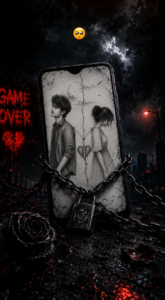
Prompt 👇
Use the uploaded image as the exact phone screen reference. Preserve the artwork inside the phone exactly as shown (the broken-heart sketch of the boy and girl with the Hindi quote). Do not alter or crop the artwork.
Create an ultra-realistic 8K cinematic dark poster in a vertical 4:5 Instagram ratio.
Scene:
A premium black smartphone stands slightly tilted on a wet, cracked ground.
The phone screen displays the uploaded heartbreak artwork naturally fitted inside the screen with realistic perspective.
Heavy black iron chains tightly wrap around the phone from multiple directions.
A large metallic padlock with an Instagram logo hangs in the center of the chains.
The phone glass is cracked with realistic fractures.
Background features a stormy night sky with dark clouds, lightning, rain mist, and a ruined city skyline.
A glowing red street light appears on the right side.
A black rose lies on the wet ground in the foreground with scattered dark rose petals.
Red glowing embers float through the air.
Text & Effects:
On the left wall, add glowing blood-red graffiti text: GAME OVER 💔
Place a 🥺 emoji above the phone.
No extra text or watermark.
Color & Lighting:
Dark black, charcoal grey, and deep crimson color palette.
High contrast cinematic HDR lighting.
Wet reflections on the ground.
Dramatic shadows, volumetric fog, realistic rain atmosphere.
Ultra-detailed metal chains and lock.
Premium DSLR quality, photorealistic, razor-sharp focus, shallow depth of field.
Emotional, heartbreak, lonely, cinematic mood
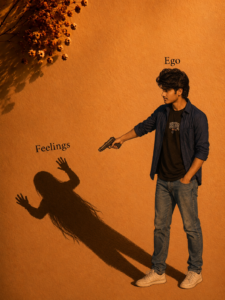
prompt👇
reference. Preserve 100% facial identity, hairstyle, skin tone, facial structure, expression, and all unique features exactly. Do not alter the face.
Create an ultra-realistic 8K cinematic conceptual portrait inspired by the reference image. The young South Asian man stands on the right side, wearing the same blue open shirt, black T-shirt, blue jeans, and white sneakers, with one hand in his pocket and the other arm extended forward.
The background is a minimal warm orange textured wall with golden sunset lighting and soft dramatic shadows. Add a small bunch of dried flowers in the top-left corner, casting natural shadows on the wall.
A large dark shadow stretches across the wall and ground. Instead of a normal silhouette, the shadow becomes the same young man (same hairstyle, same face profile, same body shape), but in a shadow-like monochrome form, with both hands raised in a defensive pose, creating a symbolic emotional effect.
Place the word “Ego” above the real person in elegant black serif font and “Feelings” above the shadow in the same font.
Keep the composition clean, artistic, and emotional with soft cinematic lighting, realistic long shadow projection, subtle wall texture, shallow depth of field, HDR, ultra-detailed skin, premium color grading, photorealistic, 8K, vertical 4:5 Instagram poster, with no extra objects or watermark.
Tool Name
Type
Best For
Watermark on Free Plan?
Core Strengths
CapCut
Free / Freemium
Short-Form / Mobile / PC
No (If watermark end-clip is deleted)
Fast UI, Auto-Captions
DaVinci Resolve
Free Pro Tool
Cinematic / Colour / VFX
No
Hollywood Engine, Zero Cost
Descript
Premium / Freemium
Podcasts / Talking Head
Yes (on free tier)
Text-Based Video Trimming
Opus Clip
Freemium
Long to Short Repurposing
Yes (Free Plan)
Auto Virality Clip Extraction
Wondershare Filmora
Premium / Freemium
Beginner Timeline NLE
Yes
Ease of use, Heavy AI Assists
Runway
Paid Generative AI
VFX / Cinematic AI Visuals
No (Cr
edit Based)
Gen-AI Video Creation
Bonus Tip: Smart Hybrid AI Editing Workflow for Maximum Efficiency
Ek professional editor kabhi bhi 100% single AI tool par rely nahi karta. Best quality output aur zero cost ke liye aapko Hybrid Workflow Strategy adopt karni chahiye:
- Rough Cut & Silence Stripping: Apni raw long video ko Gling AI ya Descript mein daal kar saare silent pauses, bad takes, aur “um/ah” noise filter karein.
- Main Timeline Editing: Is project file (XML/EDL) ko CapCut Desktop ya DaVinci Resolve mein import karke main cuts, transitions, aur colour correction karein.
- Audio Enhancement: Audio track ko Adobe Podcast AI se run karke studio-quality audio level achieve karein.
- Captions & Virality Polish: End mein final video ko Submagic ya Opus Clip se pass karke high-engagement animated text apply karein.
Pro Tip: Is multi-stage workflow se aap kisi bhi single paid tool ke watermark issue se bach sakte hain aur aapki video quality human-edited feel deti hai, robotic nahi lagti.
Essential Beginner Guidance for AI Tool Integration
Agar aap abhi editing journey start kar rahe hain, toh AI tools use karte waqt yeh key guidelines mind mein rakhein:
- AI ko Assistant Samjhein, Replacement Nahi: AI aapka rough cut 80% fast kar sakta hai, lekin pacing, timing, emotional cuts, aur story curve hamesha human brain hi fine-tune karega.
- Over-reliance on Auto-Captions se Bachien: AI Auto-captions 90% accurate hoti hain, lekin local slang ya technical words galat transcribe kar sakti hain. Export se pehle proofreading zaroor karein.
- Aspect Ratio Awareness: Social media vertical (9:16) aur horizontal (16:9) formats ke composition rules alag hote hain. Auto-reframe feature use karne ke baad subject framing ko double check karein.
- System Specs Optimisation: Web-based AI tools (jaise VEED, Canva, Opus) ke liye stable internet zaroori hai, jabki offline tools (DaVinci, Filmora) ke liye dedicated VRAM/GPU required hota hai. Choose according to your hardware.
Conclusion
Year 2026 mein Best Free AI Video Editing Tools ne content creation ko super affordable aur accessible bana diya hai. Agar aap beginners hain aur absolute zero cost se start karna chahte hain, toh CapCut AI aur DaVinci Resolve Free se behtar koi options nahi hain. Wahan agar aap podcast ya long-form repurposing mein speed chahte hain, toh Descript aur Opus Clip aapke weekly hours save kar sakte hain. Tools chahe koi bhi ho, aapka storytelling vision sabse matter karta hai. In tools ko explore karein, practice karein, aur apna unique editing style build karein
!


